SDK for advanced app deployment
SmartPOS program for app developers offers advanced control on app deployment in specific use cases by integrating dedicated SDK .
SDK overview
SmartPOS Store integrates the 3rd-Party App Android SDK, a toolkit that enables Worldline partners to develop Android applications on the SmartPOS platform. The SDK simplifies integration with SmartPOS Store through predefined APIs.
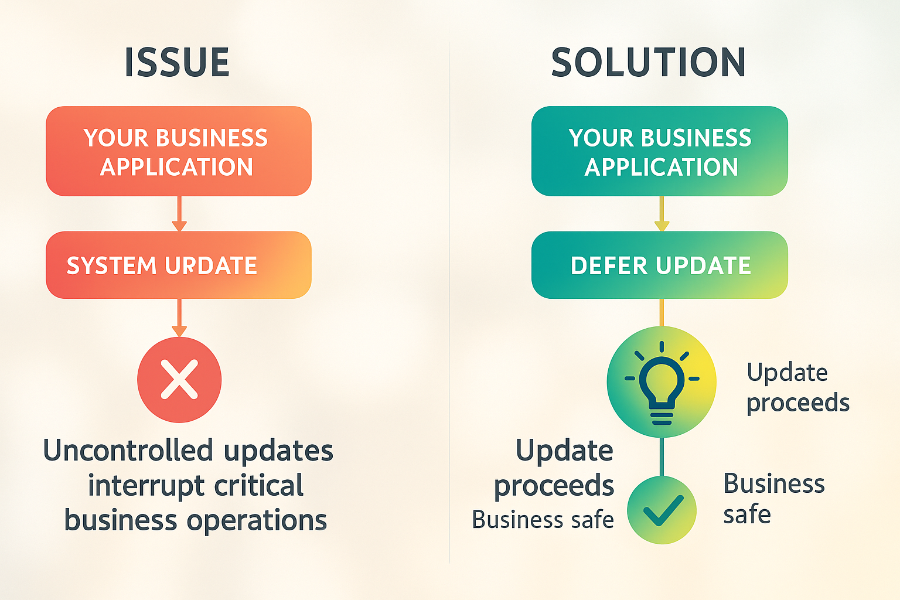
This SDK eliminates integration complexity by handling all communication with the SmartPOS Store securely, allowing to focus on building a business logic ot the application.
For technical details and updates, refer to the official SDK repository:
https://github.com/PAXSTORE/paxstore-3rd-app-android-sdk
When to use the SDK?
Use the SDK on use cases like:
Your app needs to control when updates occur based on business state (e.g., delay updates during active transactions)
Your app requires parameter updates from SmartPOS Store
Your app needs to receive cloud messages and notifications from SmartPOS Store
You want to integrate analytics and reporting with SmartPOS Store
The SDK is essential when you need your app to manage its lifecycle intelligently based on what the app is currently doing.
Supported devices
The SDK works on all SmartPOS-supported devices.
Requirements: Android SDK 19 or higher
Getting your SDK credentials
Step 1: Log in to SmartPOS Developer Center
Step 2: Create or directly navigate to your application's details page
Step 3: Get your AppKey and AppSecret from the app details page
Step 4: Follow the setup guide to integrate the SDK
Quick start
Step 1: Add the SDK dependency to your build.gradle:
implementation 'com.whatspos.sdk:paxstore-3rd-app-android-sdk:10.0.1'Step 2: Navigate to "Finding Your AppKey and Secret" page and follow the instructions
Step 3: Follow the "Update Inquirer Integration" codelab for implementation
Next page:
→
Finding Your AppKey and Secret