Finding Your AppKey and Secret
Your AppKey and AppSecret are required to initialize the SDK in your application. These credentials authenticate your app with SmartPOS Store.
STEP 1: Create your app in the SmartPOS Store Developer Center (optional if you already have an app)
Log in to Developer Center ( https://smartpos.whatspos.com/developer/#/home )
Navigate to Developer or App Management section
Click "Create New App"
Fill in your app details (name, description, etc.)
Confirm to create the app
STEP 2: Locate your credentials to SDK
Once your app is created, go to the app details page and press the "APP Keys button":
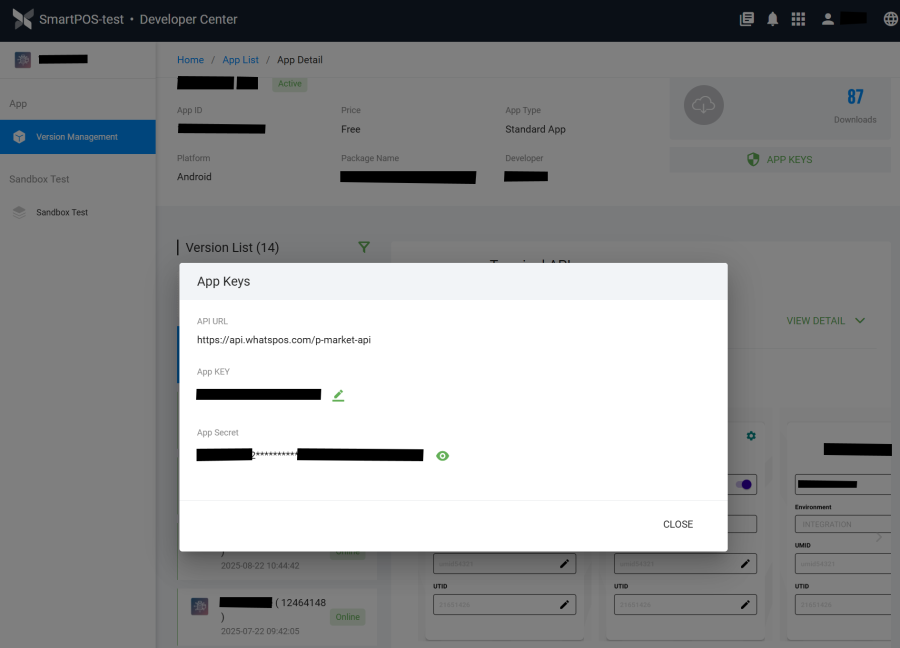
You will see:
AppKey - Unique identifier for your application
AppSecret - Secret credential for authentication
IMPORTANT: Keep your AppSecret secure and never share it publicly
STEP 3: Use keys in your project
Copy both values and add them to your code base (covered in the codelab on the next page ).